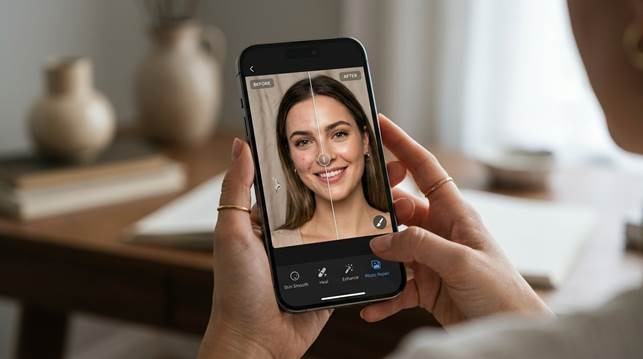
If you have ever opened a portrait and thought the photo would be great if the skin just looked a little calmer, you already understand why AI skin retouching keeps getting more attention. The problem is that many tools still treat skin like something that should be blurred into silence. That may hide a blemish, but it also removes texture, depth, and the natural detail that makes a face look human.
That is where a better mobile workflow starts to matter. You do not want a waxy filter. You want the photo to look like you on a better day. You want less redness, less distraction, and more balance without losing the expression or the feeling of the shot. At the same time, you may also need more than a skin fix. Sometimes the image is soft, old, faded, or partly damaged, which is why photo repair solutions belong in the same conversation.
Part 1. Why natural skin retouching is still hard to get right
Skin retouching sounds simple until you look closely at what usually goes wrong. Many apps smooth everything at once. Pores disappear. Texture disappears. The face starts to look flat or artificial, and the result can feel worse than the original because it is so obviously edited. That is frustrating when you were only trying to fix one small problem.
You may be dealing with acne scars, a sudden breakout, shine on the forehead, or uneven tone from difficult light. None of those things mean the whole portrait is bad. They only mean the image needs a more careful correction. That is why people keep looking for tools that can remove distractions while still keeping the face real.
Part 2. What a complete photo repair workflow should include
A useful tool should do more than smooth skin. It should also help when the photo itself needs repair. You may have a portrait that is slightly blurry. You may have an old family image with fading and scratches. You may even have a file that feels weaker because detail has been lost over time. In real life, photos rarely come with only one problem.
That is why complete photo repair solutions feel more practical than single purpose beauty apps. You can work on skin quality, image clarity, and repair in one place instead of moving from app to app. That saves time, but it also helps you think more clearly about what the photo really needs.
Part 3. Why Relumi App fits both needs
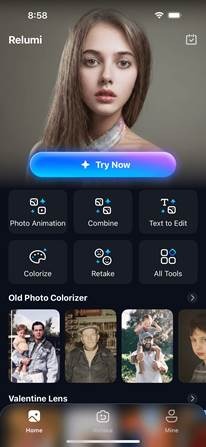
When you look at Relumi App in this category, the biggest strength is that it does not treat portrait care and image repair as separate worlds. The app connects retouching, enhancement, and repair in a way that feels more realistic for the problems people actually have.
That matters for AI skin retouching because the goal is not just smoother skin. The goal is to keep texture, expression, and facial depth while reducing blemishes, redness, and uneven tone. That is the difference between a polished portrait and a face that looks filtered.
It also helps that the app supports broader repair work. If your portrait is soft, faded, or part of an older image set, the extra photo repair features make the workflow more complete. You are not limited to one cosmetic fix when the whole image needs support.
Why this feels useful when a photo matters to you
The emotional value is simple. You do not edit a photo because editing is fun by itself. You edit because the picture matters. Maybe it is a headshot you need soon. Maybe it is a travel portrait you do not want to hide. Maybe it is an old image that connects you to someone important. A tool feels useful when it helps you keep that photo instead of giving up on it.
Part 4. How to retouch a portrait on mobile with AI Retake
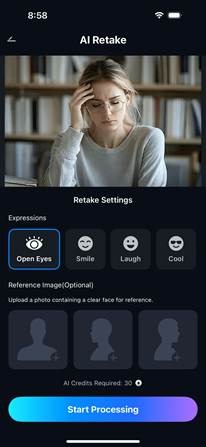
If your goal is a cleaner portrait without a fake beauty look, the official iPhone AI Retake flow is a simple place to start. It keeps the process short and easy to follow, which is exactly what you want on mobile when you are trying to save a photo instead of over editing it.
Step 1. Open AI Retake when your portrait needs a natural fix
This is a good place to begin when the photo already has the right mood but the face still needs help. You may like the expression and the lighting, yet the skin looks rough, tired, or uneven enough to distract from the whole image.
Step 2. Choose the portrait you want to clean up
Once you pick the right photo, the process becomes more focused. This matters because most people are not trying to fix every photo they have. You usually want to save one image that already felt meaningful, flattering, or worth posting.
Step 3. Let the app process the retouching result
This step matters when you want cleaner skin without spending time on manual edits. A good mobile result should reduce redness, blemishes, and uneven tone while keeping the face believable instead of turning it smooth in a plastic way.
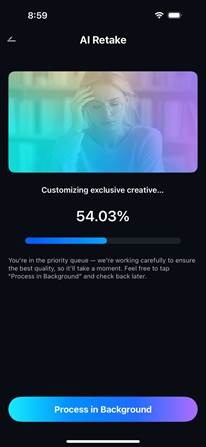
Step 4. Review the portrait and save the better version
The final check is important because a strong retouch should still look like you on a good day. When the result feels balanced and real, the photo becomes much easier to keep, post, or use for something professional.

Part 5. What separates a believable result from an artificial one
A believable result keeps your face intact. It does not erase every pore or flatten every shadow. It removes what feels distracting and keeps what feels human. That is why natural retouching often looks more professional than aggressive smoothing. The person in the picture still looks like themselves, only more balanced and more rested.
This is also why AI skin retouching works best when it is paired with broader repair tools. If the photo is dull, blurry, or damaged, skin correction alone may not be enough. The stronger result comes from seeing the image as a whole. You are not just fixing skin. You are helping the entire photo feel usable again.
That idea matters whether you are editing a selfie, a portrait from a trip, a headshot, or an old printed image. In each case, the goal is the same. You want the photo to feel closer to the moment you meant to keep.
Quick comparison: what you really want from portrait repair
| Photo problem | Why it feels frustrating | What a good tool should do |
| Uneven skin tone | The whole portrait feels less polished | Balance the skin without hiding real texture |
| Blemishes or redness | One small issue steals attention | Reduce the distraction and keep the face natural |
| Soft or low quality image | The portrait loses detail and confidence | Sharpen the image while keeping expressions real |
| Old or damaged photo | A memory starts to feel lost | Restore detail so the photo becomes usable again |
If a tool can give you that balance, it becomes much easier to trust. You can use it more often because the result feels clean, realistic, and worth keeping.
Conclusion
A strong mobile editor should not force you to choose between natural looking skin and practical repair tools. That is why this category is moving beyond simple beauty filters. People want cleaner portraits, but they also want sharper images, better restoration, and a way to save photos that still matter.
If you are looking for a tool that brings those needs together, Relumi App is easy to notice. It supports AI skin retouching in a more natural way and connects that with broader photo repair solutions, which makes it useful for portraits, older images, and everyday photo problems that deserve a second chance.