Introduction
If you have ever wanted to experience the thrill of racing without leaving your home, building a racing simulator is one of the most rewarding ways to do it. Unlike casual gaming setups, a racing simulator is designed to replicate real-world driving dynamics through specialized hardware and carefully configured software. This means every input you make, from steering to braking, directly affects how the virtual vehicle behaves.
Creating a simulator from scratch may seem complex at first, but when you break it down into individual components, the process becomes much more manageable. You are not just assembling equipment, you are designing an environment tailored to your preferences and skill level. Whether you are aiming for a basic setup or a professional-grade system, understanding each element is essential. This guide walks you through every stage of building a racing simulator, helping you make informed decisions and create a setup that delivers both performance and immersion.
Understanding the Different Types of Racing Simulators
Before you begin building your setup, you need to understand the different types of racing simulators available. Not all simulators are created with the same purpose, and choosing the right type depends on how you plan to use it. Some setups are designed for casual gaming, while others focus on delivering a highly realistic driving experience.
Entry-level simulators are typically compact and easy to set up. They provide a good introduction to simulation racing without requiring a large investment. These setups are ideal if you are exploring the hobby or have limited space. On the other hand, mid-range systems offer improved realism through better hardware and more stable mounting solutions.
Professional-grade simulators take immersion to the next level. These setups often include advanced components that replicate real-world driving conditions with high accuracy. They are commonly used by enthusiasts and competitive players who want maximum precision.
Understanding these categories helps you align your expectations with your budget and goals. By choosing the right type from the start, you create a solid foundation for your simulator and avoid unnecessary upgrades later.
Choosing the Right Steering System for Your Needs
The steering system is the core of your racing simulator, and selecting the right one has a significant impact on your overall experience. This component translates your physical movements into in-game actions, making precision and responsiveness essential.
You will find that steering systems vary widely in terms of performance and features. Entry-level options provide basic force feedback, which gives you a general sense of road conditions. While these are suitable for beginners, they may lack the detail required for advanced driving techniques.
More advanced systems, particularly direct drive wheels, offer higher torque and more accurate feedback, allowing you to feel subtle changes in grip, weight transfer, and surface conditions. This allows you to feel subtle changes in grip, weight transfer, and surface conditions. As a result, you can make more precise adjustments while driving.
When choosing a steering system, you should also consider factors such as build quality, compatibility, and adjustability. A durable and well-designed system ensures consistent performance over time. By investing in the right steering system, you establish a strong foundation for your simulator and enhance both control and immersion.
Pedal Systems and Why They Matter More Than You Think
Pedals are often underestimated when building a racing simulator, yet they are one of the most important components for improving consistency and control. A quality pedal set allows you to manage throttle, braking, and clutch inputs with far greater precision, which directly affects your lap times and driving confidence.
Basic pedal sets usually rely on position-based sensors, meaning the game reads how far the pedal moves. While this works for beginners, it can feel less natural compared to real driving. More advanced systems use load cell technology, which measures braking force instead of pedal travel. This creates a more realistic braking experience and helps you build muscle memory for better consistency.
Hydraulic pedal systems take realism even further by replicating the resistance and feel of actual race car braking systems. These are often preferred by experienced sim racers looking for maximum immersion and control.
When selecting pedals, focus on these key factors:
- Brake technology: Load cell brakes provide more realistic and consistent braking performance.
- Adjustability: Adjustable pedal spacing, angle, and resistance help match your driving style.
- Build quality: Metal construction and durable sensors ensure long-term reliability.
- Compatibility: Make sure the pedals work seamlessly with your wheelbase and simulator software.
Investing in a quality pedal system can dramatically improve your racing performance because braking precision often matters more than outright speed.
Cockpit Design: Comfort, Stability, and Adjustability
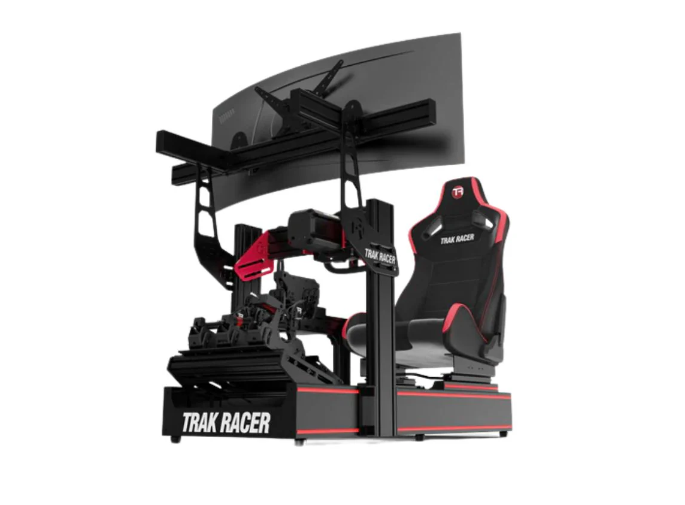
Your cockpit serves as the physical framework of your racing simulator, and its design directly influences comfort and performance. A well-built cockpit keeps all components securely in place, allowing you to focus on driving without distractions. Stability is particularly important during intense sessions, where even minor movements can disrupt your control.
Comfort is another key factor. You will likely spend extended periods in your simulator, so proper seating and positioning are essential. Adjustable seats and mounting points allow you to customize the setup to match your body and driving style. This reduces fatigue and helps maintain consistent performance.
Cockpits also vary in terms of design and functionality. Some are compact and foldable, making them suitable for smaller spaces. Others are more robust and designed for permanent installations. These often support additional accessories such as multiple monitors or motion systems.
By choosing a cockpit that balances comfort, stability, and flexibility, you create a foundation that supports all other components. This ensures your simulator remains both functional and enjoyable over the long term.
Display Options: Single Screen, Triple Monitor, or VR
The display system is what brings your racing simulator to life. It determines how you perceive the virtual environment and how effectively you can react to it. Choosing the right display setup depends on your preferences, space, and budget.
A single screen setup is the most straightforward option. It is easy to configure and requires minimal space, making it ideal for beginners. However, it may limit your field of view, which can affect situational awareness.
Triple monitor setups provide a wider perspective by extending your view across multiple screens. This creates a more immersive experience and allows you to see more of the track without relying on camera adjustments. While this setup requires more space and careful alignment, the benefits in realism are significant.
Virtual reality offers the highest level of immersion by placing you directly inside the cockpit. VR systems provide a 360-degree view, enhancing depth perception and spatial awareness. However, they may require more powerful hardware and can take time to adjust to.
Selecting the right display option ensures that your visual experience matches the level of realism provided by your hardware.
Audio and Feedback Enhancements for Realism
Audio and tactile feedback play a major role in creating a convincing racing experience. While visuals and controls are essential, sound and physical sensations add another layer of immersion that makes your simulator feel more realistic.
High-quality audio systems allow you to hear engine noise, tire grip, and environmental sounds with clarity. These audio cues provide valuable information that helps you make better decisions while driving. For example, changes in engine pitch can indicate when to shift gears.
Tactile feedback systems, such as bass shakers, add physical vibrations that simulate road texture and vehicle movement. This enhances your connection to the virtual environment by providing sensory input beyond sight and sound.
Here are some key enhancements to consider:
- Surround sound systems: These create a more immersive audio environment by distributing sound across multiple channels. You can hear directional cues more accurately, which improves awareness and reaction time.
- Headphones with spatial audio: High-quality headphones offer detailed sound reproduction and can simulate three-dimensional audio. This is particularly useful in smaller setups where speakers may not be practical.
- Bass shakers and vibration modules: These devices translate in-game events into physical vibrations. You can feel engine rumble, road texture, and impacts, adding depth to the experience.
- Integrated feedback systems: Some setups combine audio and tactile feedback for a synchronized experience. This creates a more cohesive and realistic simulation environment.
Incorporating these elements enhances immersion and helps you engage more deeply with your simulator.
Cable Management and Clean Setup Design
A well-organized simulator setup is not only visually appealing but also more functional. Proper cable management ensures that your equipment operates efficiently and reduces the risk of damage or interference.
When cables are left unmanaged, they can become tangled or obstruct movement. This can lead to accidental disconnections or wear over time. By organizing cables effectively, you create a cleaner and safer environment.
Start by planning the layout of your components and identifying where cables will run. Use cable ties, clips, and sleeves to secure them in place. This prevents clutter and makes it easier to access individual components when needed.
A clean setup also improves airflow, which helps maintain optimal performance for your hardware. Additionally, it simplifies maintenance and troubleshooting.
By investing time in cable management, you enhance both the appearance and reliability of your simulator. This attention to detail contributes to a more professional and enjoyable setup.
Software and Game Compatibility Considerations
Hardware alone does not define your racing simulator. The software you choose plays an equally important role in shaping your experience. Ensuring compatibility between your equipment and simulation titles is essential for smooth operation.
Different games support varying levels of hardware integration. Some titles are designed specifically for simulation setups and offer advanced features such as realistic physics and detailed customization options. Others may be more limited in scope.
You should also consider how your hardware interacts with the software. Drivers and firmware updates are necessary to maintain compatibility and performance. Keeping your system updated ensures that all components function correctly.
Here are some important considerations:
- Supported hardware profiles: Check whether your steering system and pedals are fully supported by the game. This ensures accurate input mapping and feedback.
- Customization options: Look for software that allows you to adjust settings such as force feedback and sensitivity. This helps you fine-tune your setup.
- Performance requirements: Ensure your system meets the hardware requirements of the simulation software. This prevents lag and maintains smooth gameplay.
- Regular updates and community support: Active development and user communities provide valuable resources and improvements over time.
By selecting compatible software and maintaining your system, you create a seamless and enjoyable racing experience.
Upgrading Your Setup Over Time Without Wasting Money
Building a racing simulator is an ongoing process. Instead of trying to achieve a perfect setup immediately, it is more effective to upgrade gradually. This approach allows you to learn what works best for your needs and avoid unnecessary expenses.
Start with a basic configuration that covers essential components. As you gain experience, you can identify areas that require improvement. For example, you may decide to upgrade your steering system for better feedback or invest in a more stable cockpit.
It is important to prioritize upgrades based on their impact. Focus on components that significantly enhance performance or comfort. Avoid replacing equipment that still meets your needs, as this can lead to wasted resources.
Research and planning are key to making informed decisions. By understanding the capabilities of each component, you can choose upgrades that complement your existing setup.
This incremental approach ensures that your simulator evolves in a cost-effective and efficient manner, providing long-term value and satisfaction.
Maintaining and Calibrating Your Simulator for Peak Performance
Regular maintenance and calibration are essential for keeping your racing simulator in optimal condition. Over time, components can experience wear or drift from their original settings. Addressing these issues ensures consistent performance and extends the lifespan of your equipment.
Calibration involves adjusting your hardware to match the software accurately. This includes setting steering sensitivity, pedal response, and force feedback levels. Proper calibration ensures that your inputs are translated correctly into the simulation.
Maintenance tasks may include cleaning components, checking connections, and updating firmware. These steps help prevent technical issues and maintain reliability.
You should also monitor the performance of your system during use. If you notice changes in responsiveness or accuracy, it may be time to recalibrate or inspect your equipment.
By maintaining and calibrating your simulator regularly, you ensure that it continues to deliver a high-quality experience. This attention to detail allows you to focus on improving your skills and enjoying your setup.
Conclusion
Building a racing simulator from scratch is a rewarding process that combines technical knowledge with personal customization. By understanding each component and how it contributes to the overall experience, you can create a setup that meets your specific needs.
From selecting the right steering system to maintaining your equipment, every step plays a role in achieving realism and performance. Taking a structured approach helps you avoid common mistakes and make informed decisions.
As your experience grows, your simulator can evolve with you. By upgrading strategically and maintaining your system, you ensure long-term value and enjoyment.